LED panel AGGE Backlit Panel PRO - 40W / 3000K-6000K / Surface mounted
A ceiling light designed for offices, shops and public spaces, spreading even and soft light over a wide area. Adjustable color temperature (3000/4000/6000K) allows you to create the right lighting for different spaces. Surface mounting brackets ensure a neat installation. IP40 rating.
Select option:

Product Faq
A ceiling light designed for offices, shops and public spaces, spreading even and soft light over a wide area. Adjustable color temperature (3000/4000/6000K) allows you to create the right lighting for different spaces. Surface mounting brackets ensure a neat installation. IP40 rating.
- 5600 lm light output
- Adjustable color temperature
- 3000K/4000K/6000K
- Frosted diffuser
- Reduces glare
- Distributes light evenly
- CRI 90Ra
- Surface-mounted
AGGE Backlit Panel PRO is an LED panel with adjustable color temperature, designed to provide even illumination in large spaces. With a diameter of 60 cm, the luminaire is an excellent choice for offices, retail stores, and public buildings where large areas need to be illuminated. The luminaire produces a light output of 5600 lumens, while the high-quality frosted diffuser covering the LEDs reduces glare and distributes light evenly and softly throughout the surrounding area, creating optimal lighting conditions for working. The color temperature can be set to warm 3000K, natural 4000K, or cool 6000K, which is ideal for bright general lighting. The warm color temperature creates a cozy and relaxing atmosphere in spaces such as break rooms, lobbies, and meeting rooms, while the more neutral, daylight-like 4000K and 6000K settings provide balanced general lighting and help maintain alertness throughout the working day. With a high color rendering index of CRI 90Ra, the luminaire reproduces surrounding colors naturally, supporting visual clarity and contributing to a comfortable working environment.
The surface-mounted Backlit Panel PRO is a stylish and discreet solution for general lighting. The included mounting brackets allow for a neat installation, positioning the luminaire slightly below the ceiling surface. The surface-mounted Backlit Panel PRO is an excellent choice for rooms with standard ceiling heights. With an IP40 rating, the luminaire is designed for use in dry indoor environments. Two-year (24-month) warranty!
The drivers are also available separately here:
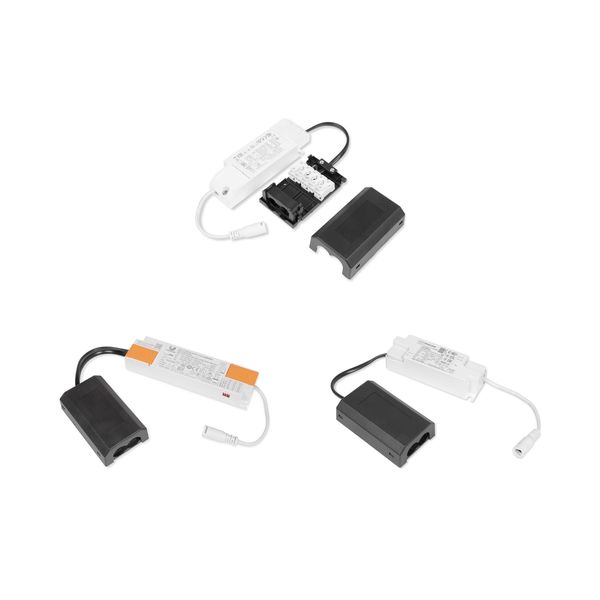 Driver for AGGE Backlit Panel PRO
Delivery contents
- AGGE Backlit Panel PRO
- Driver (On/Off, TRIAC, or DALI, depending on selection)
- Surface-mounting brackets
- Installation and wiring instructions
Technical specifications 
- Brand and model: AGGE Backlit Panel PRO
- Intended use: As an LED panel, e.g. in an office
- Operating voltage: 220-240V
- Light source type: Fixed LED
- Electrical power: 40 W
- Light output: 5600 lm
- Color temperature: 3000K/4000K/6000K
- Color rendering index: CRI 90Ra
- Dimmable: Yes
- Color: White
- Dimensions: 595 x 595 x 32 mm
- Dimensions of the recess: 590 x 590 mm
- Lifespan: 50,000 hours
- IP rating: IP40
- Warranty: 24 months
Quick guide
You can find the manufacturer's installation instructions by clicking here.
Note! The color temperature is selected from the switch on the power cord: CW: 6000K, NW: 4000K, WW: 3000K.
The DALI transformer can be controlled traditionally with an ON/OFF switch, a DALI signal or a "Push Dim" switch, meaning that it does not require a separate push-button dimmer, but dimming can also be achieved via a basic spring-return switch (thereby providing a signal to the DALI transformer).
Push Dim Memory Function Settings:
1. Basic Functions
- Make sure that the AC power is on and the push button switch (PUSH) is connected correctly.
- Short press (< 0.4 s): Turns the light on or off (ON/OFF).
- Long press (> 0.4 s): Adjusts the brightness (dimming).
2. Saving a specific brightness level (Preset mode)
- You can lock the light to always turn on at a specific brightness (e.g. 50%):
- Adjust the light to the brightness level you want.
- Quickly press the switch twice.
- The light will flash twice and then stay on. This means that the current brightness level has been saved.
- After this, a short press will always turn on the light at the saved 50% brightness.
- The light will remember this setting even if the main switch or fuse is turned off.
3. Deleting a saved brightness level
To delete a locked brightness level:
- Turn off the light using the push button switch.
- Press the switch twice quickly.
- The light will automatically turn on at full brightness. This indicates that the preset memory has been cleared.
4. Standard memory mode (default setting)
Once the individual brightness setting has been deleted (step 3), the system returns to the standard memory mode:
- The light will automatically remember the last brightness level used.
- When you turn the light on again using either the push button or the mains power, the light will return to the level it was at before you turned it off.